
South Windsor Resident Lookup Records
It is a cross-check, not a single master list. The Town Clerk, Assessor, Secretary of the State, Judicial Branch, Department of Public Health, and Greater Windsor Probate District each keep a different kind of record. The first question is whether the name needs an address anchor, a family connection, a court result, a business affiliation, or a historical lead. That choice keeps a South Windsor resident lookup narrow and makes the final result easier to verify.
| Record | What It Confirms | Where | Access |
|---|---|---|---|
| Assessor and GIS | Assessed owner, parcel, situs, mailing line | Vision and MapXpress | Public property data; not an occupant roll |
| Land index | Grantor, grantee, recording date, legal description | RECORDhub and Town Clerk | Free index account; images and printing may cost |
| Voter lookup | Registration match, status, party, polling information | SOTS lookup | Protected voters and full voter data are restricted |
| Court and probate | Case identity, court, dates, status, fiduciary or party clues | Judicial Branch, GA12, and PD-04 Probate | Public index limits and sealed-record rules apply |
| Vital records | Birth, death, marriage, parents, spouse, or event place | DPH or South Windsor Town Clerk | Eligibility, age, ID, and copy rules vary |
| Business and license | Entity principal, agent, credential, status, public affiliation | SOTS Business and eLicense | Search fields vary by record category |
Use the least sensitive source that answers the question. Label each result by its fields, date, and custodian.
Verifying a South Windsor Resident
Begin with one known fact, then add independent fields. A South Windsor resident lookup is strongest when the anchor can be checked against an independent field. A name that appears in a South Windsor property card is not automatically the person who occupies the address. A voter match is not proof of ownership. A court hit with the same name is not an identity match. The following order keeps each step tied to the record's real purpose.
- Normalize the full name, middle initial, prior or married name, approximate birth year, and known South Windsor street or organization.
- Choose an anchor: Vision or MapXpress for an assessed owner, SOTS for a registered voter, a directory or yearbook for a historical person, or a business result for a public affiliation.
- Compare two or more fields, such as street, parcel account, spouse, parent, birth year, court location, docket, business ID, or date.
- Run the relevant court, probate, vital, license, or business search with the same spelling and at least one disambiguating field.
- Check the record date. A current card, an older directory, and a court result can describe different time slices.
- Request a certified copy or ask the custodian about correction procedures only when the index result matters.
Keep court fields separate from the conclusion drawn from them. No live person-specific result was selected, so the inventory is a checklist rather than an invented example.
| Result field | What to record |
|---|---|
| Docket and case name | Case number, party names, and the court's case label |
| Party role | Defendant, plaintiff, petitioner, respondent, or another displayed role |
| Court and category | Manchester GA12 or another location, case type, year, and sequence |
| Dates | Filing or return date and disposition or sentencing date when shown |
| Activity and documents | Public events, filings, appearances, and eligible linked images |
| Visibility note | Sealed, protected, family, juvenile, or victim-identifying material may be absent |
- Docket
- A court's identifying number and case record, used to find events and filings tied to one matter.
- Index versus image
- An index is a searchable entry. An image is the scanned filing or instrument, which may require a fee or a clerk visit.
- Certified copy
- A copy issued or attested by the custodian as a true record, rather than a screen print from a search page.
Note: A negative search is a gap to explain, not proof that a person never lived in South Windsor.
South Windsor Name Variants and Same-Name Trap
Names change shape across Connecticut records. Search a full legal name, initials, prior or married surnames, and spacing variants. Court and probate forms split names differently, while directories may shorten a first name or use a widow notation.
South Windsor adds a local geography trap. The town was created from East Windsor in 1845, so an older person may appear under Windsor, East Windsor, East Windsor Hill, Wapping, or another regional label. A regional directory may list "South Windsor" as a town entry without giving a modern street address. For older names, a South Windsor resident lookup should use printed page images and the South Windsor Directory Book to distinguish OCR mistakes from real spelling changes.
South Windsor Assessor Versus Occupant
The South Windsor Assessor and MapXpress are useful for an address anchor. Vision points to the real-estate record search, while the GIS map connects a parcel to an account, mapped location, property card, and related layers. A field card can show an assessed owner, situs, mailing line, land use, value, building characteristics, and map or book-page clues. The town states that discovery, listing, and valuation are measured as of October 1, and the inspected portal identifies the October 1, 2022 revaluation at 70% of market value.
Owner and occupant are different facts. Situs is the physical location, mailing is tax correspondence, and the legal description defines the land. None proves who is present. Vision's historical cutoff and MapXpress's full span were not located, so older questions move to the Town Clerk, deeds, directories, or archives.
For a South Windsor resident lookup involving a named road, use the address-first South Windsor street directory workflow, which keeps parcel, deed, voter, permit, and historical layers distinct.
South Windsor GA12 Criminal Search Fields
South Windsor criminal and motor-vehicle matters are served by Hartford Judicial District Geographical Area 12 in Manchester. A South Windsor resident lookup involving a court record is useful only when its required and optional fields are used carefully. The Connecticut pending search requires a last name, uses begins-with matching up to 60 characters, and lets the searcher narrow a name with the fields below.
| Field | Required | Format or choices |
|---|---|---|
| Last Name | Yes | Begins-with search; maximum 60 characters |
| First Name Initial | No | One character maximum |
| Birth Year | No | Four-character year |
| Birth Year Range +/- | No | One character that adds a range around the entered year |
| Court Location | No | All locations or Manchester GA12 and other listed courts |
| Case Type | No | Criminal, Motor Vehicle, or referred license and registration matters |
| Search | Action | Submits the defendant search |
The disposed or conviction route uses the same identity fields for a different question. Sealed or protected material stays hidden, and the Judicial Branch says online case information is not the official record. Older material may require a clerk or courthouse public computer.
The criminal search image from the Judicial Branch portal shows the field pattern and court choices without selecting an arbitrary person.
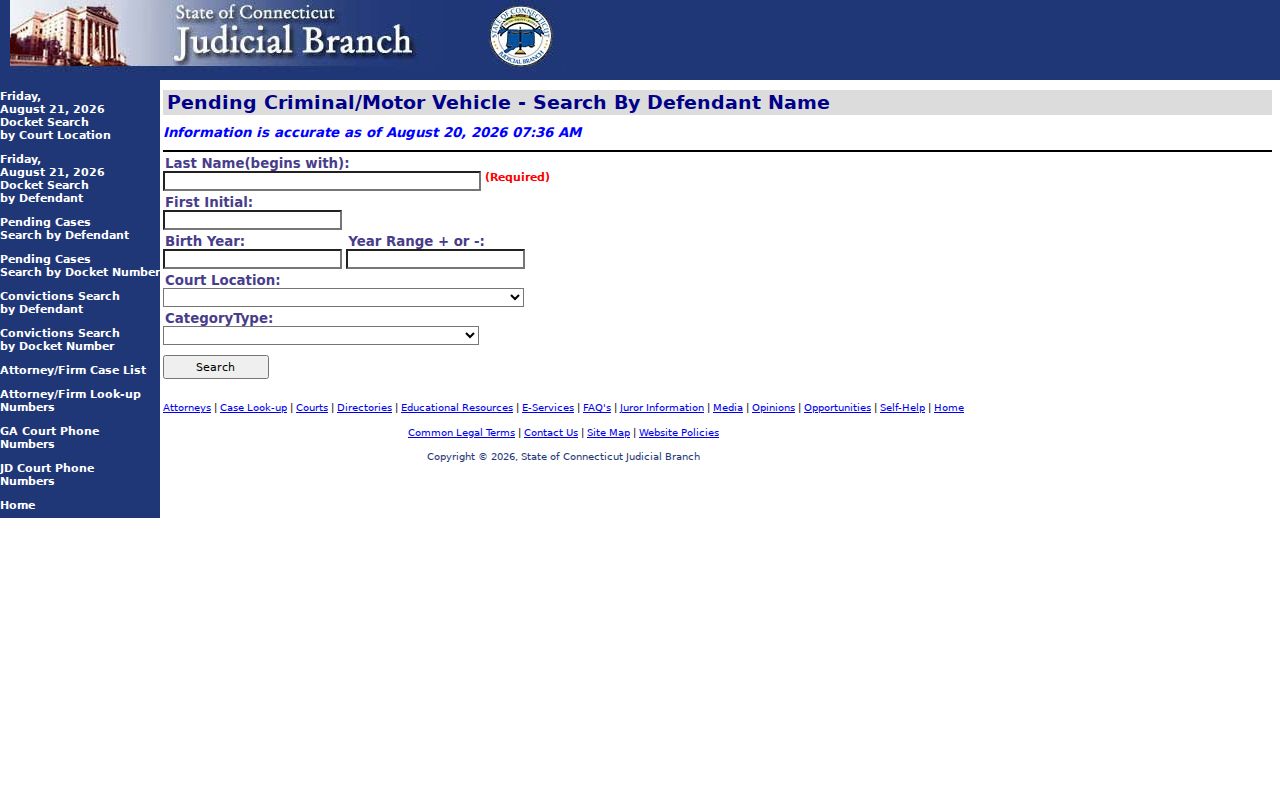
This capture makes the last-name requirement and GA12 option visible before a name is treated as a possible match.
South Windsor Civil Portal Limits
The statewide Connecticut civil inquiry portal offers party, docket, attorney or firm, property-address, short-calendar, and court-location routes. The detailed form was blocked in inspection, so exact labels, required fields, pagination, and results remain a documented gap.
Judicial Branch guidance places qualifying public civil and small-claims documents online from January 1, 2014, with a small-claims cutoff of October 16, 2017. Older material may require a courthouse computer; family, sealed, and protected records are more limited.
South Windsor PD-04 Probate Fields
For a South Windsor resident lookup involving an heir, estate, or trust, select Greater Windsor Probate District PD-04, which serves South Windsor, East Windsor, and Windsor. The Connecticut Probate case lookup requires Case Type and Status, with Decedent's Estate or Trusts as the case choices and Both, Open, or Closed as the status choices. District, Last Name, and First Name are optional search fields, and the inspected form has Reset and Search controls but no date-range field.
The Greater Windsor clerk is at South Windsor Town Hall, 1540 Sullivan Avenue, phone extension 2371, weekdays 8:00 a.m. to 4:00 p.m. The public result is only an index. Ask the clerk for the case number, file access, and copy route; local copy fees were not located.
The probate capture at the official lookup shows the district, case-type, status, and name controls used to narrow a South Windsor record.
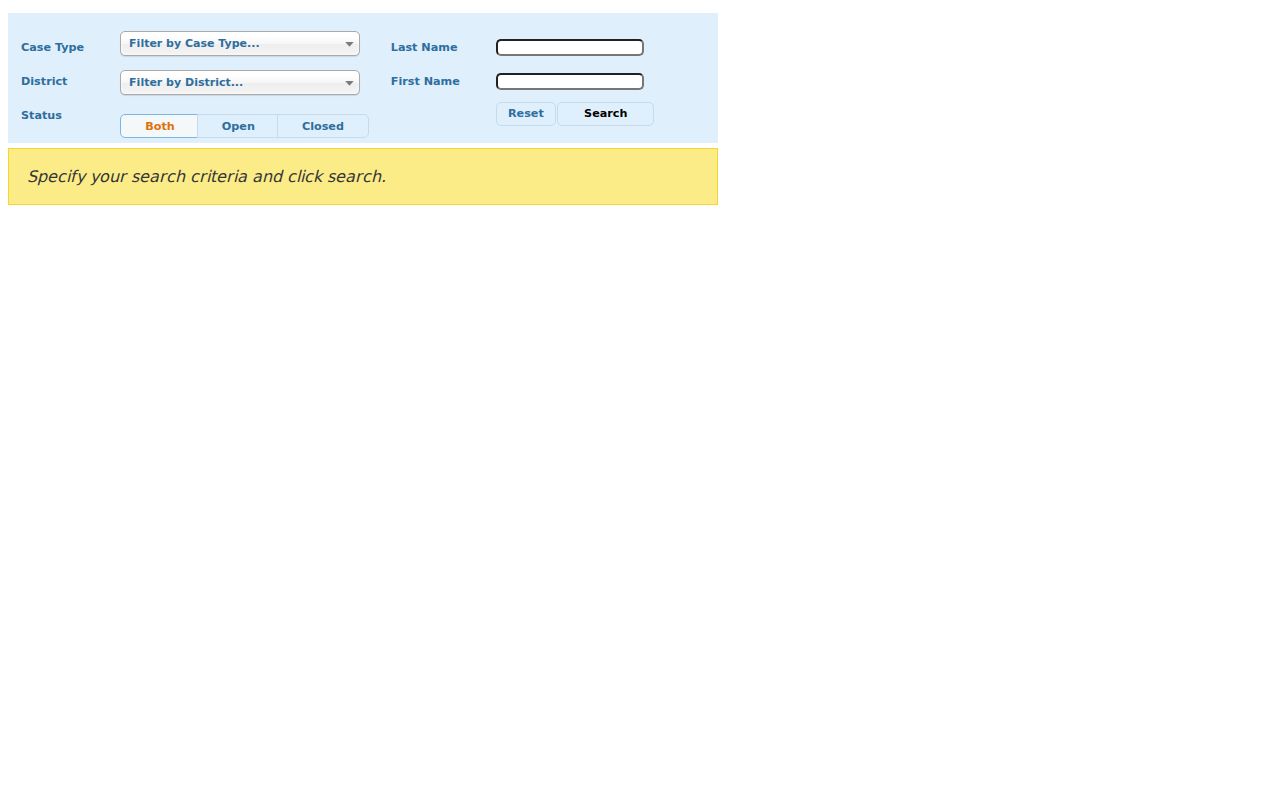
Use the displayed fields to separate an estate lead from a trust lead, then request the underlying file from the custodian when the index is not enough.
South Windsor Vital Routes: 100-Year Birth Rule
South Windsor vital-record requests move through the Town Clerk or Connecticut Department of Public Health. A South Windsor resident lookup that reaches a birth or death question must follow the same eligibility rules as any other request. DPH holds statewide birth, marriage, and death records from July 1, 1897 forward, while towns keep local event and resident records under state rules. Birth certificates less than 100 years old are confidential except for eligible requesters under C.G.S. §7-51. Birth records at least 100 years old are public. Births on or after January 1, 2003 can be certified by any Connecticut town or DPH; earlier births use the town of birth, a qualifying mother's-residence town, or DPH.
Current guidance lists town copies at $20, state birth, stillbirth, and fetal-death copies at $30, and state death, marriage, and civil-union copies at $20. Use in-person, mail, or approved VitalChek ordering, which adds a service fee. State processing can take up to 12 weeks. Death and marriage copies are available to people age 18 or older, but Social Security numbers remain restricted. Divorce decrees come from Superior Court.
For pre-1897 research, use State Library and Archives guides, church and cemetery records, newspapers, Wood Memorial, or the Historical Society. A genealogical purpose alone does not open a recent birth copy.
South Windsor SOTS ALEI and eLicense
A public business link can corroborate a person's affiliation without being treated as a home address. The Connecticut Business Records Search accepts business name, business ALEI, or filing number. Results can identify the entity, principal, agent, formation date, type, street, city, state, ZIP, and annual-report filings. Search the entity first, save the ALEI or filing number, and then read the person or agent field in context.
The state eLicense lookup varies by credential and may show a number, name, city, specialty, practice city, address, ZIP, type, status, and expiration. Use it as a separate check. Local permits and trade-name records are distributed among town and state custodians.
South Windsor Privacy and FOIA Limits
Connecticut's Freedom of Information Act, C.G.S. §§1-200 through 1-242, opens non-exempt records but does not override vital, voter, DMV, sealed-court, juvenile, adoption, victim, or safety limits. Name the agency, record, and date in a request. A denial may be appealed to the Freedom of Information Commission within 30 days.
The Connecticut Data Privacy Act does not erase a Town Clerk deed, court docket, voter record, vital record, or assessor card. Safe at Home supplies a substitute mailing address to qualifying participants, while the Voter Privacy Program under C.G.S. §9-50(d) can suppress street and house information. DMV data is not an ordinary FOIA source.
For a South Windsor resident lookup with an apparent error, contact the creating custodian. Connecticut C.G.S. §§53a-181c, 53a-181d, 53a-181e, 53a-183, and 53a-184 prohibit stalking, harassment, threats, and intimidation.
The Connecticut Sex Offender Registry notice is a separate statutory public-safety resource. It warns that the state has not assessed each listed person's risk or decided that the person is currently dangerous.
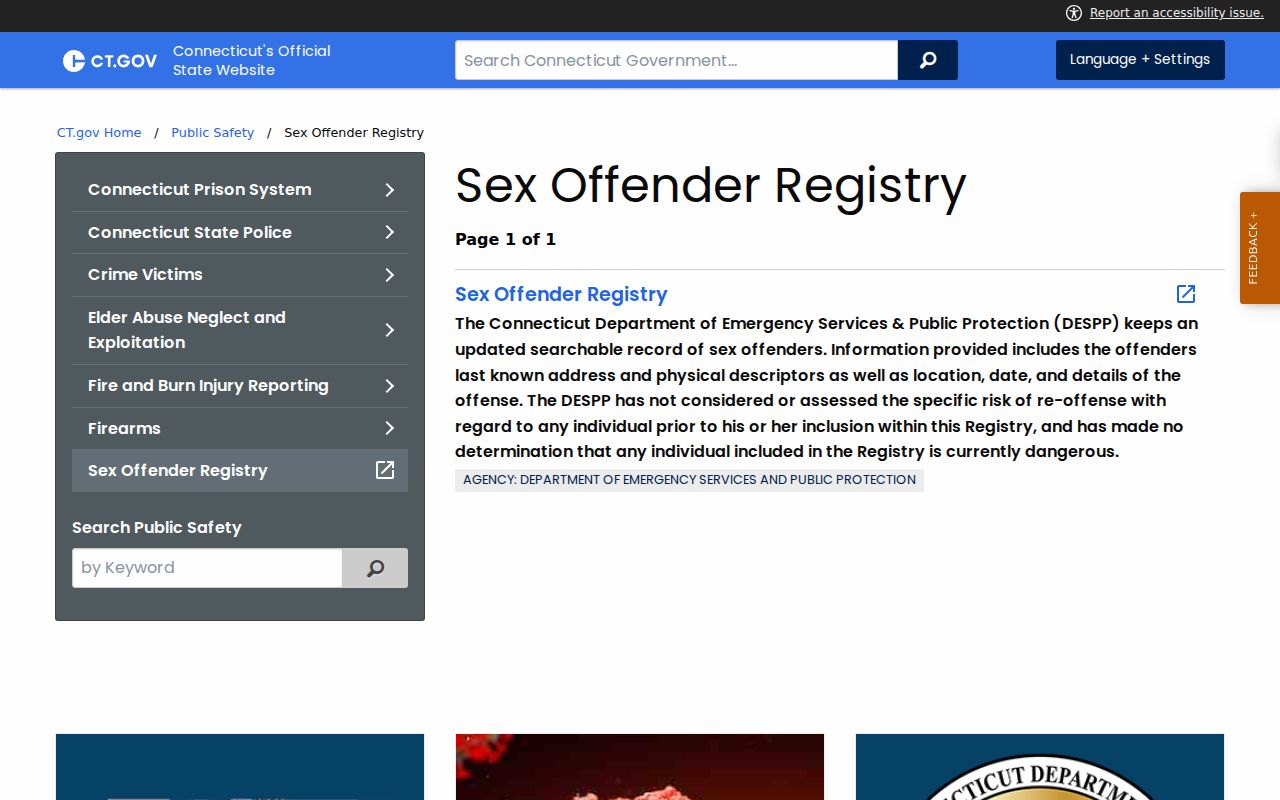
That caution belongs with the official registry page, not with a broad claim about a person's identity or current conduct.
Lawful use. South Windsor records may support personal, family, genealogy, property, and civic research. Do not use the search to stalk, harass, monitor, threaten, or intimidate anyone.